Open-Mesh Cloudtrax
Legacy Hardware
This vendor's wireless products have been discontinued or are no longer widely deployed. This guide is maintained for reference but may not reflect current firmware versions. For modern alternatives, see our Configuration Guides.
This page explains the configuration of Open-Mesh devices to work with IronWifi Captive Portal.
IronWifi Console Configuration
- Log into the IronWifi console or register for free
- Create a new network
- After that, create a new captive portal, with vendor Open Mesh (Cloudtrax)
Access Point Configuration
Open the configuration page of Cloudtrax and navigate as follows.
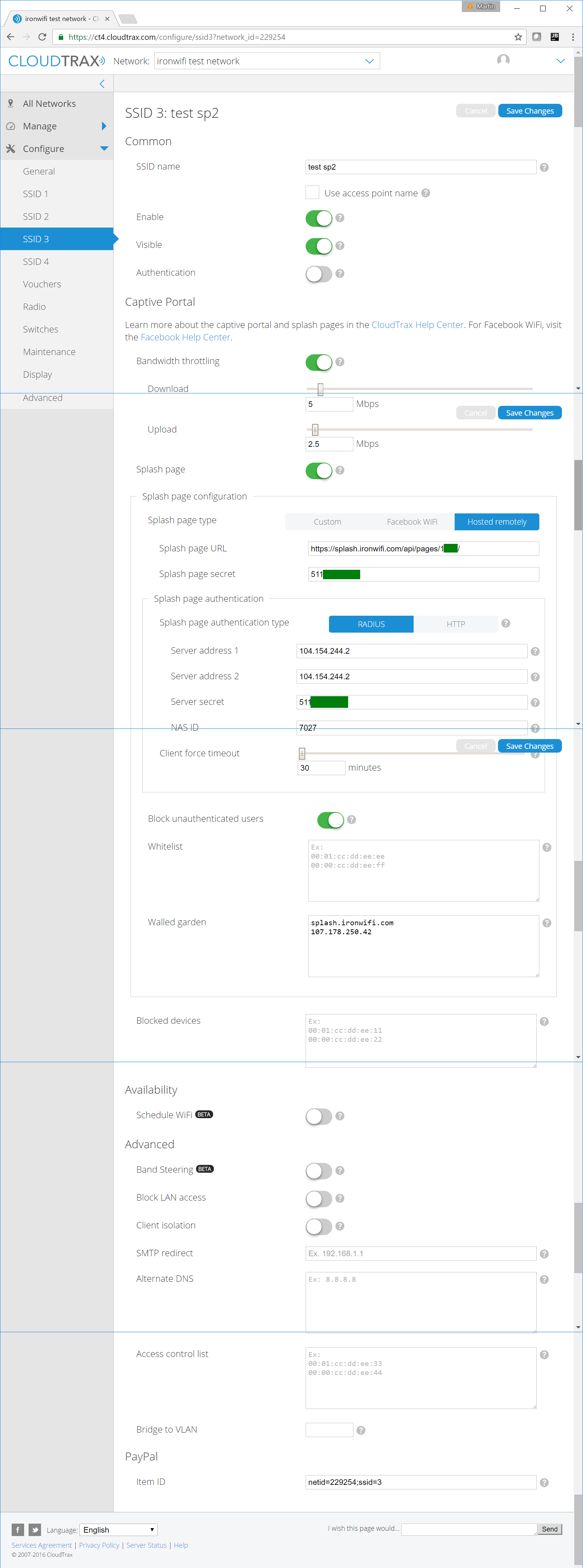
- Navigate to Configure -> SSID and under Captive Portal, configure with:
- Splash page - Enabled
- Splash page type - Hosted remotely
- Splash page URL - get this value from the IronWifi console
- Splash page secret - get this value from the IronWifi console
- Splash page authentication type - RADIUS
- Server address 1 - get this value from the IronWifi console
- Server address 2 - get this value from the IronWifi console
- Server secret - get this value from the IronWifi console
- NAS ID - 7027
- Block unauthenticated users - Enabled
- Walled garden - your_region.ironwifi.com, 107.178.250.42 The configuration is now complete.
! You must also install a valid SSL certificate on your controller/AP, in order to avoid authentication issues !